Assignment 5: Distributed Training and Fine-Tuning
The goal of this assignment is to implement the core pieces of three techniques used to train large models on more than one GPU: data parallelism, pipeline parallelism, and DeepSpeed ZeRO with LoRA fine-tuning. Each part is a separate, self-contained experiment; you do not need to combine them into a single runtime.
The whole assignment is graded automatically by the provided grader (grade.py) and is worth 100 points. Course staff compute your score by running this grader on your submitted zip file on two V100 GPUs (see Grading). Before you submit, you can run the same grader yourself:
- 58 points are correctness checks that also run on a Linux or macOS machine without a GPU (on Windows, use WSL).
- 16 points check the real DeepSpeed ZeRO engine and need two CUDA GPUs with DeepSpeed 0.16.9.
- 26 points are the data-parallel and pipeline speedups, which are only measured on two V100 GPUs.
All test models and inputs are generated locally, so no dataset, model download, or Hugging Face account is needed. You do not submit figures or logs. The README and the code comments call Problems 1, 2, and 3 "Part A", "Part B", and "Part C".
Setting up the Code
The starting code base is provided in llmsystem/llmsys_hw5. On PSC, clone it into your project storage ($PROJECT) rather than your home directory, because the Python environment you create inside it needs several GB:
cd $PROJECT        # on PSC; anywhere you like on other machines
git clone https://github.com/llmsystem/llmsys_hw5.git
cd llmsys_hw5
Code files layout
assignment/
    data_parallel.py        # Problem 1: data parallelism (you edit this file)
    pipeline.py             # Problem 2: pipeline parallelism (you edit this file)
    finetune.py             # Problem 3: ZeRO + LoRA (you edit this file)
    runtime.py              # Provided: pipeline workers and the LoRA layer (do not edit)
grade.py                    # The grader: runs every criterion and writes a JSON report
grading/                    # Grader checks and speedup benchmarks (do not edit)
tests/merged/, tests/grader/  # Grader tests (do not edit)
scripts/
    grade_bridges.sbatch    # Runs the full grader on two V100s on PSC Bridges-2
    create_submission_zip.sh
The data_parallel/, pipeline/, and project/ folders, tests/test_data_parallel.py, tests/test_pipeline.py, and scripts/run_benchmarks.py are from a previous version of this assignment. They are kept for reference and are not graded.
Environment Setup
Use Python 3.11 on Linux for the full grading environment. Run these commands from the repository root; they create the environment in .venv inside the repository.
# On PSC, load the CUDA module first. DeepSpeed checks the CUDA toolkit
# even though this assignment does not compile any custom kernels.
module load cuda/12.4.0

# On PSC, keep package caches out of your small home directory
export PIP_CACHE_DIR=$PROJECT/.cache/pip UV_CACHE_DIR=$PROJECT/.cache/uv

# Create a Python 3.11 environment. If uv is not installed yet:
#   curl -LsSf https://astral.sh/uv/install.sh | sh
uv venv --python 3.11 --seed .venv
source .venv/bin/activate

pip install --upgrade pip
DS_BUILD_OPS=0 pip install -r requirements.txt
If Python 3.11 is already installed, python3.11 -m venv .venv works instead of uv venv. A few notes:
- You are required to use the pinned DeepSpeed 0.16.9; the grader does not support other versions.
DS_BUILD_OPS=0tells DeepSpeed not to compile optional CUDA kernels during installation; this assignment does not use them.-
If you are working on your own laptop, you can run the CPU correctness checks (58 points), and DeepSpeed is not required. Install every package except DeepSpeed:
-
If
pip install -r requirements.txtfails, or the grader reports a package or version error, reinstall with the exact package versions used for grading (Linux only):DS_BUILD_OPS=0 pip install -r docs/environments/core-lock.txt
Requesting GPUs on PSC
You need two V100 GPUs on the same node for the GPU criteria. For interactive debugging:
# Use the GPU allocation assigned to this course
interact -A <your-allocation> -p GPU-shared --gres=gpu:v100-16:2 -n 5 -t 01:00:00

# After the compute-node prompt appears:
module load cuda/12.4.0
cd /path/to/llmsys_hw5
source .venv/bin/activate
python grade.py --device cuda
exit
Or submit the provided batch script from the repository root:
sbatch -A <your-allocation> scripts/grade_bridges.sbatch

# If your environment is not .venv inside the repository:
CORE_PYTHON=/absolute/path/to/.venv/bin/python sbatch -A <your-allocation> scripts/grade_bridges.sbatch
The script requests two V100 GPUs for up to 1 hour. It prints the score to hw56-grade-<jobid>.log and writes the report to artifacts/grade-<jobid>.json, with per-criterion logs in artifacts/grade-<jobid>-logs/. Install all packages before requesting GPUs, and always exit the interactive session when you are done so the GPUs are released. See the PSC interactive-session instructions for details.
Implementation Markers
All code you need to write is between # BEGIN_STUDENT and # END_STUDENT in the three files under assignment/. Keep the public function signatures unchanged. Besides the code inside those regions, you may add import lines at the top of these three files (the standard library, PyTorch, or other packages in requirements.txt).
Only these three files are submitted and graded. The grader uses its own copy of every other file, so do not add new modules, and do not rely on changes to any other file. Ordinary Python and PyTorch operations are allowed. Do not:
- replace the manual data-parallel code with
DistributedDataParallel, - replace the pipeline with a model that runs the stages one after another,
- edit the supplied runtime, grader, or tests,
- hardcode outputs for the test fixtures.
Checking Your Work
The grader runs each criterion in a fresh process and prints the points earned:
python grade.py --device cpu                      # all CPU-checkable criteria (up to 58 points)
python grade.py --device cpu --section dp         # only Problem 1 (also: pipeline, finetune)
python grade.py --device cuda                     # full grade inside a two-V100 allocation
python grade.py --device cuda --output artifacts/my-grade.json
The report (artifacts/grade.json by default) lists every criterion with its status, points, runtime, and a log file containing the assertion or traceback when it fails. blocked means the grader could not run that criterion on this machine, because the required hardware or package is missing (for example, a speedup criterion on a CPU). It is not a failure; run it again on two V100 GPUs, where every criterion can run. Before you write any code, every criterion fails; that is expected.
Problem 1: Data Parallel (35 points)
In data parallelism, every GPU (rank) holds a full copy of the model and processes a different slice of each global batch. After the backward pass, the ranks average their gradients so that every copy takes the same optimizer step, exactly as if one GPU had processed the whole batch.
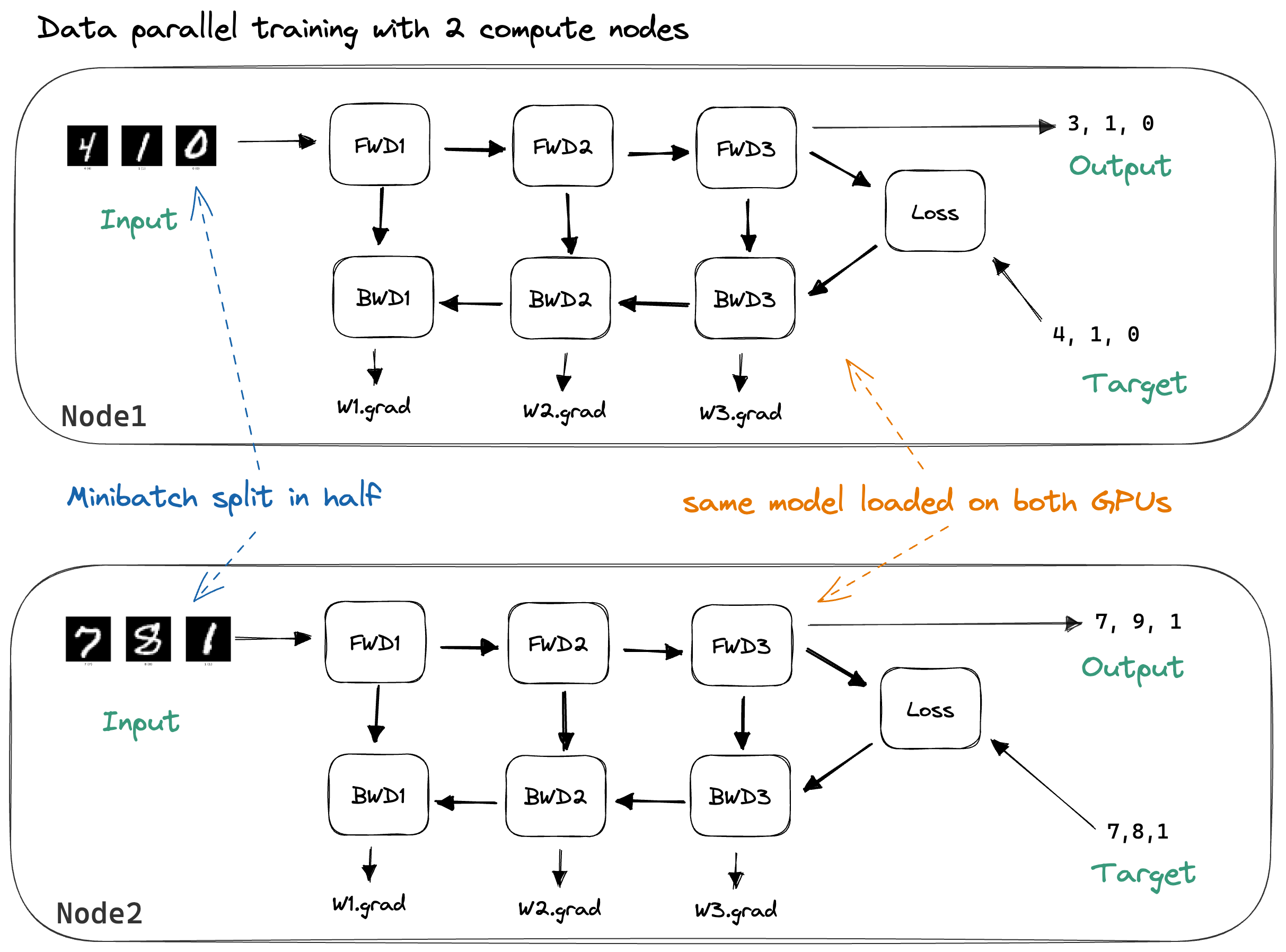
Use torch.distributed for all communication. The grader creates the process group for you.
Problem 1.1: Partition the Dataset (7 points)
Implement partition_indices in assignment/data_parallel.py:
It returns a list of world_size lists (one per rank, in rank order) that together contain every index in range(size) exactly once.
- Shuffle the indices with a local
random.Random(seed). Do not callrandom.seedorrandom.shuffle, which change the global random state. - Balance the partitions: rank
rgetssize // world_sizeindices, plus one extra ifr < size % world_size. Empty partitions are allowed when there are fewer examples than ranks. - The same seed must give the same partitions. Different seeds should give different partitions; the grader checks this with
size=100,world_size=3, and seeds 19 and 20. - Raise
ValueErrorfor a negativesizeor aworld_sizesmaller than 1.
Hint: Slicing by fractions such as int(len * 0.5) can silently drop the leftover examples. Compute the partition sizes with integer division and the remainder.
Problem 1.2: Average Gradients (7 points)
Implement average_gradients:
Walk through the model parameters and replace each gradient, in place, with its mean across all ranks.
- Call
all_reduceasdist.all_reduce(...)(ortorch.distributed.all_reduce(...)). The grader counts these calls and cannot see calls made throughfrom torch.distributed import all_reduce. - Sum with
dist.ReduceOp.SUMand divide by the world size. Do not useReduceOp.AVG; the CPU checks use the gloo backend, which does not support it. - Parameters that were not used in the forward pass have
grad=Noneon every rank. Skip them; they must stayNone.
The grader gives each of two ranks half of a batch, calls your function, and checks every gradient against the gradient of a single process that sees the whole batch.
Problem 1.3: Training Step (7 points)
Implement train_step:
In this order: clear the gradients with the optimizer, compute loss_fn(model(inputs), targets), call loss.backward(), call your average_gradients(model), and take one optimizer.step(). Return the local loss as a Python float (for example, loss.item()).
The grader runs three steps on two ranks and compares the parameters after each step with a single-process reference that trains on the full batch. This criterion uses a correct average_gradients supplied by the grader instead of yours, so a mistake in Problem 1.2 does not cost you these points.
Problem 1.4: Two-GPU Speedup (14 points)
On two V100 GPUs, the grader trains the same MLP two ways and compares the time: on one GPU with the whole batch of 8,192 rows, and with your train_step on two GPUs, each with half of the rows. You need at least a 1.40× speedup:
Timing covers the forward pass, loss, backward pass, gradient communication, and optimizer update. The grader runs two warmup steps, then times both versions five times and uses the median speedup. It also checks your parameters against the single-GPU result every time, so skipping work does not earn credit. Performance points also require all correctness criteria of Problem 1 to pass.
Problem 2: Pipeline Parallel (35 points)
In pipeline parallelism, the model is split into consecutive stages on different GPUs, and each batch is split into microbatches. While stage 1 works on microbatch 0, stage 0 can already start microbatch 1, so the GPUs work at the same time instead of waiting for each other.
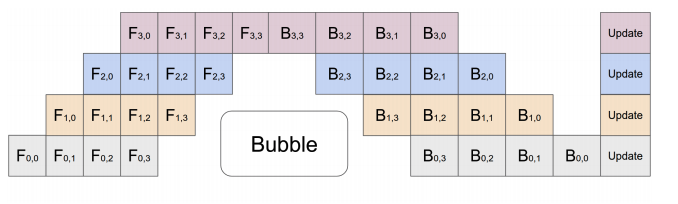
Problem 2.1: Clock-Cycle Schedule (5 points)
Implement clock_cycles in assignment/pipeline.py. It is a generator that produces the schedule of the figure above, one wave per clock tick.
For example, with 3 microbatches and 3 stages:
k  (i,j)  (i,j)  (i,j)
-  -----  -----  -----
0  (0,0)
1  (1,0)  (0,1)
2  (2,0)  (1,1)  (0,2)
3         (2,1)  (1,2)
4                (2,2)
where k is the clock tick, i the microbatch, and j the stage.
Note on indices: in the figure, each row is one device, and F_{a,b} means stage a working on microbatch b. In the code, pairs are written the other way around, as (microbatch, stage).
- Yield each wave as a Python list of
(microbatch, stage)tuples, for example[(1, 0), (0, 1)]. - Yield
microbatches + stages - 1waves. Wavekcontains exactly the pairs with0 <= i < microbatches,0 <= j < stages, andi + j == k, sorted by increasing stage. - Yield nothing when
microbatches == 0. - Raise
ValueErrorfor a negative number of microbatches or fewer than one stage. Raising when the generator is first iterated is fine.
Problem 2.2: Pipeline Forward and Backward (18 points)
Implement Pipe.forward:
The stages are already placed on their devices (self.stages[j] lives on self.devices[j]), and each stage has a worker thread. Pipe must work for any number of stages: the grader uses 1, 2, and 3 stages, and several stages may share a device (with three stages on two GPUs the devices are cuda:0, cuda:1, cuda:0). Always use self.devices[...] instead of hard-coding devices.
Read StageWorkers in assignment/runtime.py first. Its API is:
self.workers.submit(stage, fn): runsfn()on that stage's worker thread.self.workers.receive(stage): waits for that stage's result and re-raises any exception.
Your forward pass should:
- Split
inputsalong the batch dimension into microbatches ofself.split_sizeexamples each. The last microbatch may be smaller, and asplit_sizelarger than the batch gives a single microbatch (this is whattorch.splitdoes). - Get the schedule by calling
clock_cycles(number_of_microbatches, number_of_stages). - For each wave, call
submitexactly once for every(microbatch, stage)pair, in the order the wave lists them, before calling anyreceive. Then callreceiveonce for every pair, in the same order. Receive every result of a wave before submitting anything from the next wave. Each submitted function does all the work for its pair, including any device transfer and running the stage. Do not submit extra functions, for example a separate copy task. - Concatenate the outputs in the original example order on the last device (
self.devices[-1]) and return them.
The grader records every submit and receive call, so the order in step 3 is checked exactly.
Two criteria grade this problem:
- Forward (6 points): submit/receive order, output values, output device, repeated calls on the same
Pipe, no gradient tracking undertorch.no_grad(), and error handling. If a stage raises an exception,forwardmust let that original exception propagate (same type and message); do not swallow it or wrap it in a different exception. - Backward (12 points): the input gradient, every parameter gradient, and three optimizer updates must match the same stages run one after another without pipelining.
Both criteria use a correct schedule supplied by the grader instead of yours, so a mistake in Problem 2.1 does not cost you these points.
Hints:
- Do every cross-device transfer inside the function you submit, not in the calling thread. Either way works: the function can move its input to its own stage's device first, or move its output to the next stage's device before returning it. Transfers in the calling thread still give correct results, but they make the stages run one at a time, and your speedup in Problem 2.3 will fall below 1.10×.
- The submitted functions run later on another thread. Bind loop variables as default arguments, e.g.
lambda m=module, x=batch: m(x). Otherwise every function sees the values from the last loop iteration. torch.splitreturns a tuple; convert it to a list if you want to store results in place.- Do not detach tensors when moving them between devices, or the earlier stages will not receive gradients.
Problem 2.3: Pipelined Speedup (12 points)
On two V100 GPUs, the grader compares one training step of your Pipe against ordinary model parallelism, which sends the full batch through the same two stages one after the other. Both use four MLP blocks per GPU and the same 8,192-row batch; your pipeline uses eight microbatches of 1,024 rows. You need at least a 1.10× speedup:
The measurement protocol is the same as in Problem 1.4, and these points also require all correctness criteria of Problem 2 to pass.
Problem 3: DeepSpeed ZeRO and LoRA (30 points)
Data parallelism keeps a full copy of the parameters, gradients, and optimizer states on every GPU. ZeRO (Zero Redundancy Optimizer) removes this redundancy by partitioning the training state across the data-parallel ranks:
- Stage 1 partitions the optimizer states.
- Stage 2 also partitions the gradients.
- Stage 3 also partitions the parameters.
In this problem you configure and drive a real ZeRO stage 2 engine from DeepSpeed.
LoRA (Low-Rank Adaptation) fine-tunes a large model by freezing its original weights and training a small low-rank update for selected linear layers. For a frozen linear layer with weight W_0 and bias b, the adapted layer computes
where r is the rank, A has shape (r, in_features), B has shape (out_features, r), and only A and B (lora_A and lora_B) are trained. B starts at zero, so the adapted model initially computes exactly the same outputs. The provided LoRALinear in assignment/runtime.py already implements this math; your job is to insert it into a model, train it with ZeRO, and save and load only the adapter weights.
Problem 3.1: DeepSpeed Configuration (6 points)
Implement build_config in assignment/finetune.py:
Return a DeepSpeed configuration dictionary with these entries:
| Key | Value |
|---|---|
train_micro_batch_size_per_gpu |
micro_batch |
gradient_accumulation_steps |
accumulation |
train_batch_size |
world_size * micro_batch * accumulation |
zero_optimization |
{"stage": 2}, with no CPU or NVMe offloading (leave out the offload settings) |
zero_allow_untested_optimizer |
True, so that the grader's torch.optim.SGD can be used with ZeRO |
gradient_clipping |
0 (no clipping), so the result can be compared with a reference |
fp16 |
{"enabled": True} only when precision == "fp16"; otherwise leave it out or set {"enabled": False} |
Do not enable bf16, and do not add optimizer or scheduler sections: the grader passes its own SGD optimizer to DeepSpeed.
Raise ValueError if world_size, micro_batch, or accumulation is smaller than 1, or if precision is anything other than "fp32" or "fp16" (including "bf16").
Two criteria grade this problem:
- Configuration (2 points): the returned dictionary is checked directly, for several sizes and both precisions.
- Live ZeRO-2 engine (4 points, GPU only): the grader starts a real two-rank DeepSpeed engine from
build_config(2, 2, 2, "fp32")and trains it for three steps against a reference.
Problem 3.2: Apply LoRA (6 points)
Implement apply_lora:
Replace exactly the named nn.Linear modules with LoRALinear(module, rank, alpha). Names are the dotted names from model.named_modules(), such as "0.2" or "encoder.proj".
- Validate every target before changing anything. Raise
ValueErrorfor an empty list, duplicate names, a name that is not in the model, a module that is notnn.Linear, orrank < 1. After a rejected call the model must be completely unchanged: no module replaced and norequires_gradflag changed. - Freeze every existing parameter of the model, including layers you did not target. After the call, the only parameters with
requires_grad=Trueare the newlora_Aandlora_Bof the targeted layers. - Do not move the model to another device or change its dtype, and return the same model object.
Problem 3.3: Train a Microbatch with ZeRO (12 points)
Implement train_microbatch:
Compute loss = loss_fn(engine(inputs), targets), call engine.backward(loss) and then engine.step(), and return the local loss as a Python float. The grader calls this function once per microbatch.
DeepSpeed owns gradient accumulation, gradient clearing, and loss scaling. engine.step() only updates the weights at the end of each accumulation window, then clears the gradients itself, and engine.backward already scales the loss for accumulation. So:
- Do not divide the loss yourself.
- Do not clear gradients. Unlike
train_stepin Problem 1.3, do not callengine.zero_grad(),optimizer.zero_grad(), ormodel.zero_grad(); doing so throws away the earlier microbatches of the accumulation window. - Do not call
loss.backward()oroptimizer.step()directly.
The grader trains on two GPUs with two microbatches per rank per optimizer step for three steps. After every step it compares all model weights with a single-process reference: the adapters must match, and the frozen base weights must not change.
Problem 3.4: Save and Load Adapters (6 points)
Implement save_adapter and load_adapter:
path may be a str or a pathlib.Path, and its parent directory already exists.
save_adaptersaves only thelora_Aandlora_Bparameters withtorch.save, as a flat dictionary whose keys are the names frommodel.named_parameters()(for example"0.lora_A") and whose values are CPU copies of the tensors. The file must be readable withtorch.load(path, weights_only=True). RaiseValueErrorif the model has no adapters.load_adapterrestores those tensors into a model that already has the same adapters and base weights. The file must contain exactly the model'slora_A/lora_Bnames with matching shapes; raiseValueErrorfor a missing key, an extra key, or a shape mismatch. Check every entry before copying any of them, so a rejected file leaves the model unchanged. Copy the values into the existing parameters (for example,param.copy_(value)undertorch.no_grad()) instead of replacing the parameter objects, and do not touch the base weights.
Grading
| Problem | Grader ID | Criterion | Needs GPUs | Points |
|---|---|---|---|---|
| 1.1 | partitions |
Partition: complete, balanced, seeded | 7 | |
| 1.2 | gradients |
Averaged gradients match a single process on the whole batch | 7 | |
| 1.3 | updates |
Three training steps match a single-process reference | 7 | |
| 1.4 | dp_performance |
Data-parallel speedup ≥ 1.40× | two V100s | 14 |
| Problem 1 | 35 | |||
| 2.1 | schedule |
Clock-cycle schedule | 5 | |
| 2.2 | forward |
Forward: submit/receive order, outputs, output device, no_grad, errors |
6 | |
| 2.2 | backward |
Backward: input/parameter gradients and three optimizer updates | 12 | |
| 2.3 | pipeline_performance |
Pipelined speedup ≥ 1.10× | two V100s | 12 |
| Problem 2 | 35 | |||
| 3.1 | config |
Configuration dictionary | 2 | |
| 3.1 | zero_runtime |
Live two-rank ZeRO-2 engine built from your configuration | two GPUs | 4 |
| 3.2 | lora |
LoRA targeting, freezing, device and dtype | 6 | |
| 3.3 | zero_updates |
Three accumulated ZeRO optimizer steps match a reference | two GPUs | 12 |
| 3.4 | adapter |
Adapter save/load and rejection of incompatible files | 6 | |
| Problem 3 | 30 | |||
| Total | 100 |
The grader ID is the name grade.py prints for each criterion.
- Course staff grade your submission by running the full grader (
python grade.py --device cuda) on two V100 GPUs. This reruns every criterion. The checks for 1.2, 1.3, 2.2, 3.2, and 3.4 then run on GPUs, so they can catch device mistakes that a CPU run cannot see, such as an output left on the wrong GPU or an adapter saved as GPU tensors. Passing them on a CPU therefore does not guarantee these points. - Every criterion is all-or-nothing.
- A mistake in one function usually does not cost points in another: for example, a wrong schedule (2.1) does not affect the forward/backward points (2.2), and wrong LoRA targeting (3.2) does not affect the configuration (3.1) or training-step (3.3) points.
- The speedup points of Problem 1 or 2 are only awarded if every other criterion of the same problem passes. A failed speedup does not remove correctness points.
- The speedup thresholds are calibrated for two V100 GPUs; on other GPU types the speedup criteria are reported as
blocked.
This page and the repository README.md describe the same requirements. If they ever seem to differ, the grader's checks in tests/merged/ and grading/ are what count; please report the difference to the course staff.
Submission
Create the submission archive from the repository root, with your virtual environment activated (the script runs python3):
This writes dist/hw56_submission_<timestamp>.zip and prints its path. The zip contains only your three files under assignment/. Submit that zip file on Canvas. Do not submit your virtual environment, logs, screenshots, or the whole repository.